A ground-up exploration of containers, Kubernetes and web traffic routing awaits!
So you understand the premise of a container, pretty cool right? You have one way or another been taken through a rundown of how Kubernetes can help harness these nifty little containers, and enable enterprises to run their services with a whole new level of control and efficiency. Now you feel accomplished in your understanding of this new trend, and someone has burst your bubble by uttering a sentence like, “I use Contour as my ingress controller; it deploys Envoy as the reverse proxy and load balancer, what do you use?”. You sit in your seat paralysed for a brief moment as your short-lived confidence evaporates… and then you bellow… ‘What the Heptio?!’.
Well good news, this premier blog post is aimed to try and restore your faith in the world of modern applications, and provide an overview of the principles that surround the Contour platform. 👏
Brief Side-note
If you don’t understand what I mean from the above statement, I guess this is the moment that you navigate to your search bar and get yourself anywhere other than here. Please don’t! You are only a couple of lines away from some interesting articles that will free you of those ‘What the Hell?’ signals your brain is resonating through your soul. Take a look at the provided links to get your head around the container, and how it brought about container orchestrators such as Kubernetes… it’s cool, I promise:
What is Docker? “In Simple English”
(I also thought the below video would be cool to add, as I think it’s actually a pretty neat explanation 😂)
First of all… What the Hell?
So you have your Kubernetes cluster. Put simply, a collection of compute nodes (machines) that are held to the mercy of a cluster master, that will carry out the instructions it is given. Using the nodes as its workers, it decides which containerised workloads are going to run on each of the nodes it has in it’s control. Bliss. All you needed to do was define to the master what it was you wanted, and it takes care of it for you. You run a kubectl get pods and sit back in your chair with a smug look on your face, as you gaze at your newly created pods, housing a shiny new web application you’re going to deploy. And then you think “but how does Kubernetes know how to direct traffic intended for the web application to these pods?”. Well… it doesn’t, at least not yet. This is where Ingress comes in.
In the Kubernetes world, Ingress is an application layer level (OSI Layer 7), policy defined method of directing external users to services running on a Kubernetes cluster. As forementioned, if you have a bunch of web services running inside pods, you need to make them available from a public IP address or domain (e.g. https://blog.chaosinthe.dev). Kubernetes Ingress features two main components; an ingress controller and ingress resources.
As seen in the diagram below, an ingress controller is a service based on a reverse proxy / load balancer (handy definition if needed) which once configured routes incoming traffic to the correct application within your cluster. This ingress controller can be chosen by the cluster admin, and there are a few to choose from (e.g. Nginx, Traefik, Contour 😲). The configuration of said controllers is handled by the cluster master, directed by the cluster resources; a collection of rules and configurations provided by yours truly (e.g. YAML file).
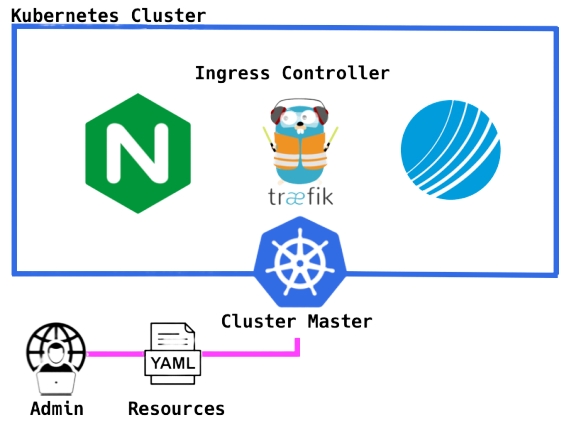
Ok awesome, you’re now entitled to lean back in your chair again, with the satisfaction that your web application is now accessible to whomever you wish it to be, through a domain name that leads back to your k8s cluster, and any requests get handled by the ingress controller, defined by your delicately defined ingress resources YAML.
⌇🔵 Spicing Things up with Contour 🔵⌇
Ok, so from the casual name drop in the previous section, we can deduce that Contour is an Ingress controller for Kubernetes. But what would makes it a good choice for Kubernetes users or enterprise environments? The Contour controller supports dynamic configuration updates. Many freely available ingress controllers designed for use in Kubernetes can be configured to work well. However, performance is hindered by the fact that any changes to the configuration files (Ingress Resources) require a restart to the service before said changes come into effect. In enterprise environments, this can very easily be seen as suboptimal for reliability and performance, not to mention just a bit of a pain. With Contour, you can kiss goodbye to these problems, with dynamic changes enabled through the use of a cool little proxy called Envoy, no restart required 🥳.
What else? Contour also features multi-team ingress delegation to protect service access on multi-team clusters 😄… ok ok, I can feel the bubble bursting a little also. To summarise in short, Kubernetes uses a control mechanism called Role Based Access Control (RBAC), that allows the cluster admins to restrict access of development teams interacting with their infrastructure to exclusively the namespaces relevant to their work. This stops the age old problem of a rogue engineering employee deciding to get their own back on a fellow employee that argued with them in the cafeteria, changing all their production front ends to cat memes.
RBAC is a superb way to manage access to clusters, however issues can arise with regard to multi-team clusters configuring ingress. Ingress is a ‘namespaced’ resource, and so control of it can be managed in the same segmented nature, but collisions can occur from the way it is configured by different teams. Alexander Brand’s blog post on this subject eloquently describes the scenario where two teams point the same domain extension (e.g. www.example.org/blog) to different service endpoints. In this instance, nothing has been defined to tell the controller what to do in the event of such a conflict, and ‘team two’ who created the conflict, are unaware of the problem they are creating… scary 👻. Contour brings a solution to this nightmare with the IngressRoute custom resource definition (CRD). A CRD is a clever feature, as it allows users to add their own custom built objects to tailor the capabilities of Kubernetes to their liking (more info here). Put simply, the IngressRoute feature brought to Kubernetes by Contour gives cluster admins full control of which teams are permitted to use which domain extensions in their resource definitions. So in the case of our engineering team who tried to steal the ‘/blog’ domain extension; they have their configuration ignored by contour and are informed of the mistake they have made. Once again if you fancy a more detailed explanation that is still succinct, please go to Alex’s article (linked above).
Okay… so what’s Envoy?
Well yes, it’s a proxy.. just the kind that you’d find inside one of your ingress controllers. But there are some key factors that made it a great choice when the Contour project was being created. First of all, Envoy is officially supported by the Cloud Native Computing Foundation (CNCF). This ensures there will be long term support and exposure for the project, making it advantageous for deployment in enterprise environments. However, in terms of its architecture, what makes it so appealing is that this proxy is ‘API driven’. What does this mean? Well in the instance of the proxies mentioned earlier such as Nginx, a config file must be edited, saved and a service reloaded, before changes are to come into effect. However through Envoys APIs (What is an API?), any changes that are needed to be made to its configuration, can be done without restart or disturbance. Yes, you guessed it, this is how the Contour project manages to give dynamic configuration updates with such ease. Finally, it is written in C++, which gives it the ability to execute very quickly, and run very efficiently. Why? Well maybe it is a bit out of scope for this post, maybe another time 😊.
If you want a more detailed/full description of the envoy proxy, and why it was a great design choice for the Contour project; please see the TGIK episode by Joe Beda that I have embedded below, and go to playtime 13:00 (watch the whole episode if you have the interest and the time to kill).
Tell me more 🙏
Okay! So first of all congratulations for getting this far, and have somehow managed to not cringe too hard at my cheesy journalism. I hope by now that you feel versed enough in the world of project contour to follow any deeper documentation. If so, crack on! Personally, I think the TGIK episode below is a great place to start, and from there you can look over the documentation to your hearts content. I have provided the relevant pages for both Contour and Envoy below.
I hope that this article has been worth the 10-15 minutes, and you feel that those ‘what the Hell?’ feelings have faded away into nothingness. At the very least, I hope that you have learned something interesting about the world of cloud native, and if there is anything I can do to help, or any feedback you would like to give; please reach out to me 🙋🏻♂️.
On the subject of feedback, any feedback is greatly received. I am still learning, so if anyone finds a small hole/caveat in my overview, that’s ok! I would really like to know, so I can review and make the necessary changes. I have even got a comments section below (so exciting), so feel free to discuss what you like down there.